
How to assign roles to team members
Automatic translation. View original
Each team member can have different roles in your school. You can add or remove roles according to the person's work.
To change these roles, you need the role Administration in this school. The role Director, by itself, does not allow managing the team.
Before starting
Check if the person appears in Team → Members. If they do not appear yet, follow the step-by-step to invite an instructor.
The invitation links the person to the school but does not automatically assign roles. Roles from another school are not copied.
Open a member's roles
- Log in to PADMA with your user.
- Open the school settings from your user menu.
- Make sure you are in the correct school.
- Open Team.
- Select Members.

- Find the person in the list.
- Click on Edit roles on that person's line.
The summary next to the name shows the current roles. When there are no roles, it shows No role assigned.

Add or remove roles
In the Edit roleswindow, the Roles field shows the roles already assigned.
- To add: click the field and select the desired role.
- To remove: click the × next to the role you want to remove.
You can assign more than one role to the same person.
Each change is saved automatically. The button Close closes the window; it does not cancel the changes.
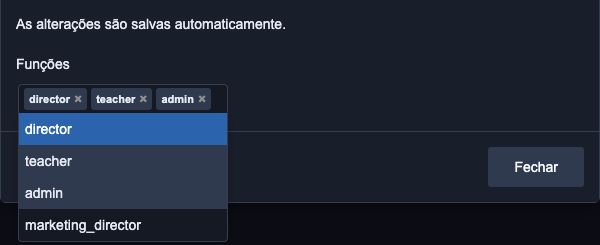
The screenshots show the interface in Portuguese, with personal data outside the frame.
Which name to select
The selector uses the names below. The team summary shows the translated names.
| Name in selector | Name in summary |
|---|---|
| teacher | Instructor |
| admin | Administration |
| director | Management |
| marketing_director | Marketing management |
To assign the instructor role, select teacher. Assign admin only to those who must also manage the school and the team.
The role director does not replace admin to invite people or change roles.
Check the result
- Click on Close.
- Check the roles in the person's summary in Members.
If an error appears when updating, reload the page and check the roles before trying again.
Frequently asked questions
- "Edit roles" does not appear: ask someone with Administration in this school to review your permissions.
- I can't remove my own admin role: the system prevents you from removing your own Administration role.
- The person keeps seeing another school: they should select the correct school in Active school, in the profile, and save.
- I want to remove only one role: use the × in the selector. Unlink from the school removes the person's link with the school.