
Upload your live publication recording in two clicks
Automatic translation. View original
From the dashboard you will find the latest live/in-person classes to upload the recording
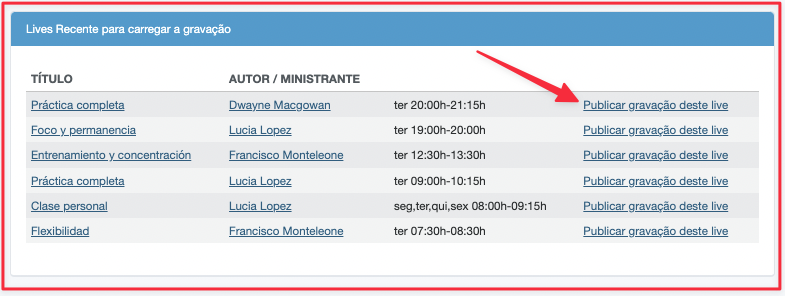
Using this option a form opens to save the recording video. The only thing you absolutely have to fill out is the video link (from vimeo, drive, youtube...)
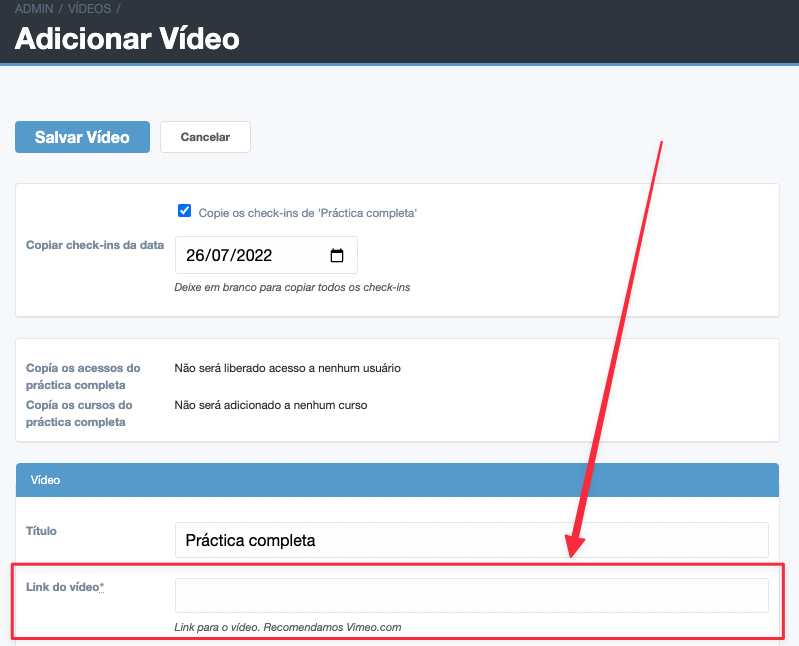
The rest of the information: duration, visibility, access (to specific users, to courses) instructor, cover image and more, will remain the same as those you configured for the live class.
Uploading recordings this wayalso keeps the check-ins, so if someone attended the live class, they will keep that check-in in the on demand publication.
You can also configure Zoom to upload recordings automatically to your video platform ( Vimeo or google drive for example), saving you this extra step.