<a id="f54aca827adb400bad0e2b585f4506bc"></a><a id="f54aca82-7adb-400b-ad0e-2b585f4506bc"></a>

<a id="2ea5934d15b14406a9de66f44dfee226"></a><a id="2ea5934d-15b1-4406-a9de-66f44dfee226"></a>

> Only supported for videos on <strong>Vimeo</strong> or <strong>YouTube.</strong>

<a id="4d429f5a1aff4667a2dc0548b2d3c892"></a><a id="4d429f5a-1aff-4667-a2dc-0548b2d3c892"></a>

# <a id="qué-son-los-timestamps" data-help-heading="true"></a>What are timestamps

<a id="eebc87f7b19b466db300ed1d5c3d3f69"></a><a id="eebc87f7-b19b-466d-b300-ed1d5c3d3f69"></a>

A timestamp is a small text in the format <strong>HH:MM:SS</strong> that refers to a specific moment in a video.

<a id="a586a483eb1b4a4bb79098d675c3931b"></a><a id="a586a483-eb1b-4a4b-b790-98d675c3931b"></a>

For example <strong>01:03:15</strong> would be 1 hour 3 minutes and 15 seconds after the video starts.

<a id="30de715f46a1401f8c61613bab3ec8c6"></a><a id="30de715f-46a1-401f-8c61-613bab3ec8c6"></a>

For videos shorter than one hour, the timestamp should still include all three parts, for example 00:30:00 for 30 minutes, and so on.

<a id="7f8a7850713d4d58b86ffa7fd224b660"></a><a id="7f8a7850-713d-4d58-b86f-fa7fd224b660"></a>

# <a id="links-a-un-momento-específico-del-video" data-help-heading="true"></a>Links to a specific moment in the video

<a id="874ca29df0ce47c38d360bc21a230685"></a><a id="874ca29d-f0ce-47c3-8d36-0bc21a230685"></a>

In the link to a video you can add <strong>?ts=HH:MM:SS</strong> so that the video starts at that exact moment when someone opens the link.

<a id="213f4dae54d8462abd6adcdc8165086c"></a><a id="213f4dae-54d8-462a-bd6a-dcdc8165086c"></a>

For example this link <a href="https://learn.derose.app/p/conversas-com-rumo?ts=00:13:35">https://learn.derose.app/p/conversas-com-rumo?ts=00:13:35</a> leads to the interview with Professor DeRose, specifically to the moment when Rumo says “Imagine all the people”.

<a id="37a5c26bd2f049d5b82aca4b61f4d014"></a><a id="37a5c26b-d2f0-49d5-b82a-ca4b61f4d014"></a>

# <a id="referencias-a-momentos-específicos-del-video" data-help-heading="true"></a>References to specific moments in the video

<a id="10a139290ba249829dc001cc59248dc4"></a><a id="10a13929-0ba2-4982-9dc0-01cc59248dc4"></a>

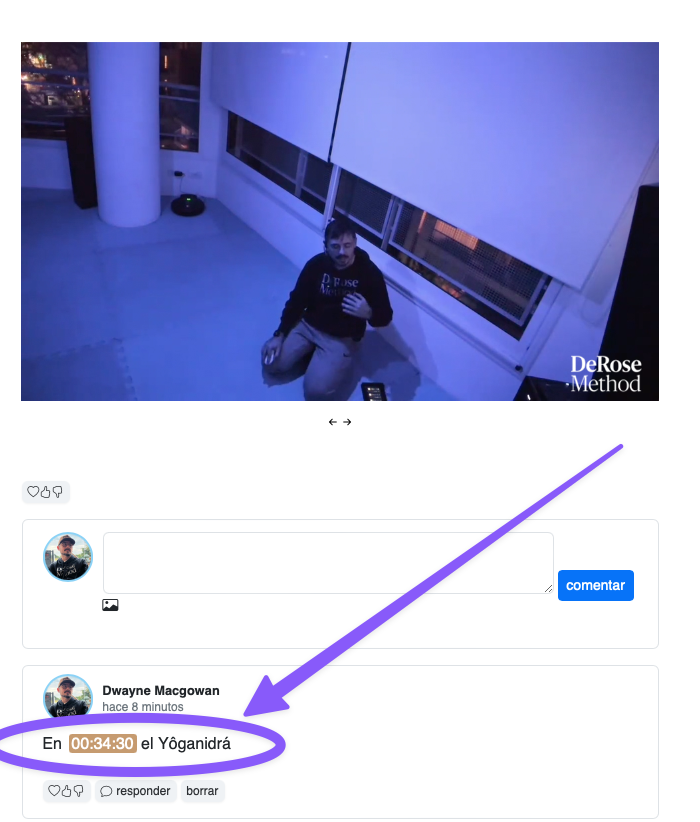
Both in the main body of a video and in comments under a video, Learn detects any timestamps present and turns them into a small button to play the video at that point.
<a id="7fbed01a232e4a8e9af65e9dcfc9cab1"></a><a id="7fbed01a-232e-4a8e-9af6-5e9dcfc9cab1"></a>

<img src="/help-assets/d3aced2de612a59571709e982ba3cf3e24baecea0d926e583df4f48736dacbe1.png" alt="CleanShot 2024-06-22 at 16.51.15.png">
