<a id="249b4f135b9d4d02bac0b7bdcb7fde23"></a><a id="249b4f13-5b9d-4d02-bac0-b7bdcb7fde23"></a>

<a id="36b3160bddf2806383b4ed262f851a32"></a><a id="36b3160b-ddf2-8063-83b4-ed262f851a32"></a>

Start by publishing in-person, online, or recorded classes so your students can find the content once they register on the platform 

<a id="36c3160bddf280ff8dd2ea47050726c9"></a><a id="36c3160b-ddf2-80ff-8dd2-ea47050726c9"></a>

<strong>To start setting up your posts, log in </strong><a href="https://learn.derose.app/admin/login"><strong>to Learn</strong></a><strong> as an instructor by logging in through Padma.</strong>

<a id="a211e9dc9cdc462a902b85483f01af70"></a><a id="a211e9dc-9cdc-462a-902b-85483f01af70"></a>

## <a id="publique-suas-atividades" data-help-heading="true"></a>Publish your activities

<a id="36b3160bddf2800681f6e42b3c436a02"></a><a id="36b3160b-ddf2-8006-81f6-e42b3c436a02"></a>

In-person, live, and hybrid classes in your weekly schedule.<br>They can be <strong>single </strong>broadcasts <strong>or carried out</strong>.

<a id="36b3160bddf2808f863ecfa34e32b108"></a><a id="36b3160b-ddf2-808f-863e-cfa34e32b108"></a>

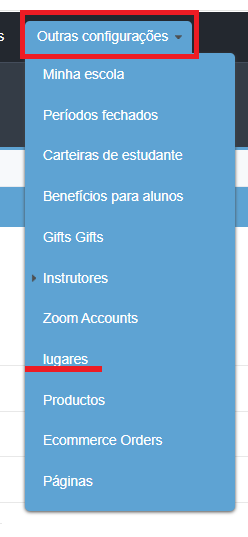
recurringly <strong>👉 To create</strong>in-person classes <a href="https://learn.derose.app/admin/dashboard">, we recommend you first enter</a>in the instructor's advanced panel: , the addresses of the locations.
<a id="36b3160bddf28078b515f77e2b65fdae"></a><a id="36b3160b-ddf2-8078-b515-f77e2b65fdae"></a>

<img src="/help-assets/f49bfc54c37572b5d5a1d124b9d40fee864fd70dcaf0f7cec6573d4b5dad4a90.png" alt="lugar.png">

<a id="36b3160bddf280a69210ee44dae0c6ba"></a><a id="36b3160b-ddf2-80a6-9210-ee44dae0c6ba"></a>

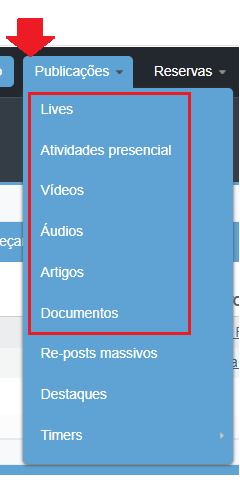
whether it's your school, a park, or another place<strong>Then, on the “</strong>Posts.<br><em>” tab, you will see the different options to open the specific creation form for your in-person class.</em>

<a id="36b3160bddf280d2a27ff1b3bbce3673"></a><a id="36b3160b-ddf2-80d2-a27f-f1b3bbce3673"></a>

<img src="/help-assets/59a11cb3702a7c1fe0ecada34ec6b1a2d59f880e88657fce0c7e83fbe35bc71f.png" alt="publicaciones.png">

<a id="36b3160bddf2804c9408c53d9c38dd60"></a><a id="36b3160b-ddf2-804c-9408-c53d9c38dd60"></a>

These classes can be hybrid with just one click <em><strong>👉 LIVES are.</strong></em>

<a id="36c3160bddf280d28b67d180499259ef"></a><a id="36c3160b-ddf2-80d2-8b67-d180499259ef"></a>

<strong>live online </strong><a href="https://app.notion.com/p/f43723b346e047788627d6601118c018?pvs=204"><strong>posts</strong></a><strong>  You can easily assign an instructor to them </strong><a href="https://app.notion.com/p/cc937137d7044d738d33fba9ac3a5cc2?pvs=204"><strong>Class substitutions</strong></a><strong> </strong>

<a id="36c3160bddf280ff8e23e9b0718ffdc6"></a><a id="36c3160b-ddf2-80ff-8e23-e9b0718ffdc6"></a>

via the. Instructor App <a href="https://soundcloud.com/discover">👉 AUDIOS</a>.

<a id="4c570783aa5f43bb97055cfd0d3a7697"></a><a id="4c570783-aa5f-43bb-9705-5cfd0d3a7697"></a>

> <strong>In the case of podcasts, it is possible to include Spotify links, but for your own audio files, we recommend specific platforms where you can upload the file, such as:<br></strong>SoundCloud <a href="https://app.notion.com/p/368a67c8f14440af95366be3d4814574?pvs=204">Recommendations</a>.<br>For recorded class videos <a href="https://app.notion.com/p/756db105b8534260888df971407e2ad8?pvs=204">We recommend Vimeo</a> For live classes we recommend Zoom, see how.

<a id="36c3160bddf280d3b107fa58a3d4f148"></a><a id="36c3160b-ddf2-80d3-b107-fa58a3d4f148"></a>

## <a id="modulo-de-booking--reservas" data-help-heading="true"></a>Add Zoom account 

<a id="36c3160bddf2807daeeceda3cd8f4881"></a><a id="36c3160b-ddf2-807d-aeec-eda3cd8f4881"></a>

> <a id="36c3160bddf280149c48efc69a821432"></a><a id="36c3160b-ddf2-8014-9c48-efc69a821432"></a>
> 
> to your Learn. Booking / reservation module.

<a id="36c3160bddf28015a5e4ea1552a5c8cf"></a><a id="36c3160b-ddf2-8015-a5e4-ea1552a5c8cf"></a>

This tool is exclusive to Learn PREMIUM.

<a id="36c3160bddf280e98128c09cc57060ef"></a><a id="36c3160b-ddf2-80e9-8128-c09cc57060ef"></a>

Not available in the free version:

- <a id="36c3160bddf2803b96e0f6c178d248c4"></a><a id="36c3160b-ddf2-803b-96e0-f6c178d248c4"></a>You can set whether activities require booking and whether that booking needs to be confirmed or not
- <a id="36c3160bddf2804992dadcd03dd30951"></a><a id="36c3160b-ddf2-8049-92da-dcd03dd30951"></a>Some of its multiple uses
- <a id="36c3160bddf280bb87fdf7a151ba0537"></a><a id="36c3160b-ddf2-80bb-87fd-f7a151ba0537"></a>Allows you to know in advance how many people will participate in the activity
- <a id="36c3160bddf280a8a05fc09a8e9161e2"></a><a id="36c3160b-ddf2-80a8-a05f-c09a8e9161e2"></a>Control access according to the plan

<a id="36c3160bddf2806ba6e1e3b69e185f5e"></a><a id="36c3160b-ddf2-806b-a6e1-e3b69e185f5e"></a>

Limit the number of available spots in the activity  <a href="https://app.notion.com/p/7455a9f7d6c0469088f43ec558b8441f?pvs=204">Offer a waiting list with priority order to release new spots - Read more about this topic and its settings</a> 

<a id="3e1fcdf918a84537b38e88048e399c08"></a><a id="3e1fcdf9-18a8-4537-b38e-88048e399c08"></a>

## <a id="visibilidade-das-publicações" data-help-heading="true"></a>Bookings

<a id="36b3160bddf280f38305d1254ca27ba0"></a><a id="36b3160b-ddf2-80f3-8305-d1254ca27ba0"></a>

Reservations:<br>Visibility of posts.<br><br>You can choose with whom you want to share your posts: <a href="https://app.notion.com/p/86ec369af1b641e8900fa9f4883ed90f?pvs=204">selecting grade, users from your school, from other specific schools, from the entire network, only those enrolled in a course, etc.</a> 

<a id="590f153339694926baf55eb4947e816c"></a><a id="590f1533-3969-4926-baf5-5eb4947e816c"></a>

## <a id="para-ampliar-o-conteúdo-que-você-oferece-aos-seus-alunos-você-pode-compartilhar-aulas-e-publicações-de-outras-escolas" data-help-heading="true"></a>👉 Here you will find all the available options

<a id="44fd8bfa464e437fb0ef55c200e07a14"></a><a id="44fd8bfa-464e-437f-b0ef-55c200e07a14"></a>

Visibility of posts:

<a id="36c3160bddf2804bb342f3a66a822861"></a><a id="36c3160b-ddf2-804b-b342-f3a66a822861"></a>

To expand the content you offer your students, you can share classes and posts from other schools <strong>Share content from other schools</strong>👉 You can <strong>share manually</strong> , curating the content that will appear to them, or share:

<a id="e9460e482ad1419a83aa64a92548195e"></a><a id="e9460e48-2ad1-419a-83aa-64a92548195e"></a>

<a href="https://app.notion.com/p/e9460e482ad1419a83aa64a92548195e?pvs=204">automatically</a>

<a id="36c3160bddf2809c8d56f5cb4a8c812c"></a><a id="36c3160b-ddf2-809c-8d56-f5cb4a8c812c"></a>

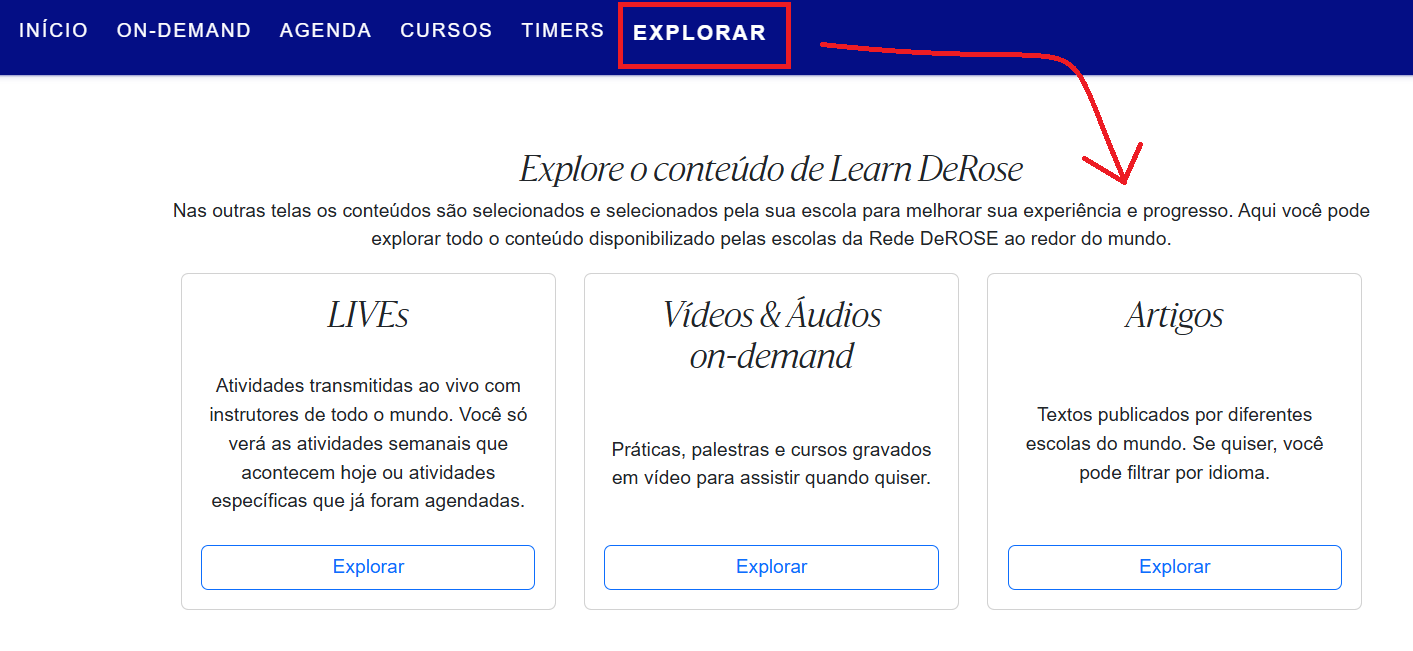
and in bulk <strong>How to share content from other schools </strong>👉 You can enable the<strong> </strong>Explore, (from your school's settings or access presets,)
<a id="36c3160bddf28099bee7ded972e349ae"></a><a id="36c3160b-ddf2-8099-bee7-ded972e349ae"></a>

<img src="/help-assets/a11f315c5565b8c26bafcd4fdd9e32cb572128bad1f137c34adac3d4e6201595.png" alt="explorer.png">

<a id="60a59cf0faa84491bf1b185ea8afb617"></a><a id="60a59cf0-faa8-4491-bf1b-185ea8afb617"></a>

# <a id="registro-de-usuários" data-help-heading="true"></a>so your users can access content from all the DeROSE Network Schools

<a id="36c3160bddf2807bbc1fc1b0ba3b441c"></a><a id="36c3160b-ddf2-807b-bc1f-c1b0ba3b441c"></a>

that use Learn.<br>User registration <strong>After having content on your platform, you can share the link for your users to register</strong>It is important that.

<a id="36c3160bddf280fe9cb0dbbcb2eecda8"></a><a id="36c3160b-ddf2-80fe-9cb0-dbbcb2eecda8"></a>

each user registers themselves-, as they need to provide personal data and create a password.

<a id="36c3160bddf28055b550fe780e7b8dea"></a><a id="36c3160b-ddf2-8055-b550-fe780e7b8dea"></a>

<strong>Without registration, students will not be able to navigate Learn, as it will not be possible to associate:</strong>

- <a id="36c3160bddf28019a6b5c8ead496583b"></a><a id="36c3160b-ddf2-8019-a6b5-c8ead496583b"></a><strong>them with a school, grade, or a specific subscription plan</strong>There are different ways to register students on Learn <strong>Through a “JOIN” link</strong> , which you find in the: https://learn.derose.app/a/SUAESCOLA/join
- <a id="36c3160bddf280b78509f53d22827ebf"></a><a id="36c3160b-ddf2-80b7-8509-f53d22827ebf"></a><strong>Advanced Panel</strong>of your school: <a href="https://app.notion.com/p/0645fa406da44a689b9ca8f38b75d3e9?pvs=204">Through a subscription link</a> 
- <a id="36c3160bddf280c1b6eae9e0cdde6765"></a><a id="36c3160b-ddf2-80c1-b6ea-e9e0cdde6765"></a><strong>, linked to the student's monthly payment or plan </strong><a href="https://app.notion.com/p/6981b70582664c55a4eeb2985504a6db?pvs=204"><strong>Charges via Learn</strong></a><strong> Through a </strong>Learn DeROSE access coupon

<a id="e6f35b736da44584aecc19ba4197863c"></a><a id="e6f35b73-6da4-4584-aecc-19ba4197863c"></a>

# <a id="acompanhamento-dos-meus-usuários" data-help-heading="true"></a>free of cost for the student 

<a id="c9e9005d4186460fa1052e9cb8f92617"></a><a id="c9e9005d-4186-460f-a105-2e9cb8f92617"></a>

<a href="https://app.notion.com/p/ed918fc503154ba399c8f7c3e904d65a?pvs=204">Tracking my users</a> 

<a id="5d7641ff5ad148a8bc8e6cf4bffa4244"></a><a id="5d7641ff-5ad1-48a8-bc8e-6cf4bffa4244"></a>

<a href="https://app.notion.com/p/f8d6a7bee28a45739c1a3274ae9920ca?pvs=204">Tracking student participation-Notification of check</a> - ins and reservations made by your students

<a id="89061ae137e346f59f4dacccf8947df5"></a><a id="89061ae1-37e3-46f5-9f4d-acccf8947df5"></a>

<a href="https://app.notion.com/p/e0175e32433149d88ba6aa8e475a581a?pvs=204">I received emails with this information-Check (ins)</a> 

<a id="db08b22ed97649bd858606f382ef2889"></a><a id="db08b22e-d976-49bd-8586-06f382ef2889"></a>

<a id="4506ed07dbba47c88fe90395c8186946"></a><a id="4506ed07-dbba-47c8-8fe9-0395c8186946"></a>

> <a href="/4854dff3dcfd456d81008e6f73389cd1">Enhanced attendance tracking  (Spanish)  Here you will find several posts that might be useful to share with your users</a>