<a id="d0511652c78e4e749b1db47dbc6517ac"></a><a id="d0511652-c78e-4e74-9b1d-b47dbc6517ac"></a>

<a id="7e6ca3c097c94d04bf99ef2af7138094"></a><a id="7e6ca3c0-97c9-4d04-bf99-ef2af7138094"></a>

- <a href="#b5596ac8801b444586c3d8eff606b2e8">Where agreements appear</a>
- <a href="#b38fd1a994cd4cf4a56a5cc60fe92bc5">Who can see the agreements</a>
- <a href="#85d7dacde1d34877b106b36ee533a778">Sections of the benefits screen</a>
  - <a href="#7e842d0fb9a942a7bed10db43da34784">Tab “All”</a>
  - <a href="#b0e9e4e925c04760a5988277feede1d8">Tab “In my region” (100 km)</a>
  - <a href="#3dc796bf0fd041ad830ae499993bc7ab">Tab “Near me” (3 km)</a>
- <a href="#340f993805c947c6af36977b2b7120bc">Who can register agreements</a>
- <a href="#b2066e57afed4243b56e0eb91061ee61">How to register my agreements</a>
  - <a href="#3fbfe9982ab14a9892d3d35d0775a177">Agreement validity</a>
- <a href="#9b7dc0ef0c614a5e826ab2371d872e15">Student ID</a>

<a id="a4c54c890ef54c60a765eb79b25d807c"></a><a id="a4c54c89-0ef5-4c60-a765-eb79b25d807c"></a>

<a id="b5596ac8801b444586c3d8eff606b2e8"></a><a id="b5596ac8-801b-4445-86c3-d8eff606b2e8"></a>

# <a id="dónde-aparecen-los-convenios" data-help-heading="true"></a>Where agreements appear

<a id="e8a971ddb1994b35a22a2fe15b1f937d"></a><a id="e8a971dd-b199-4b35-a22a-2fe15b1f937d"></a>

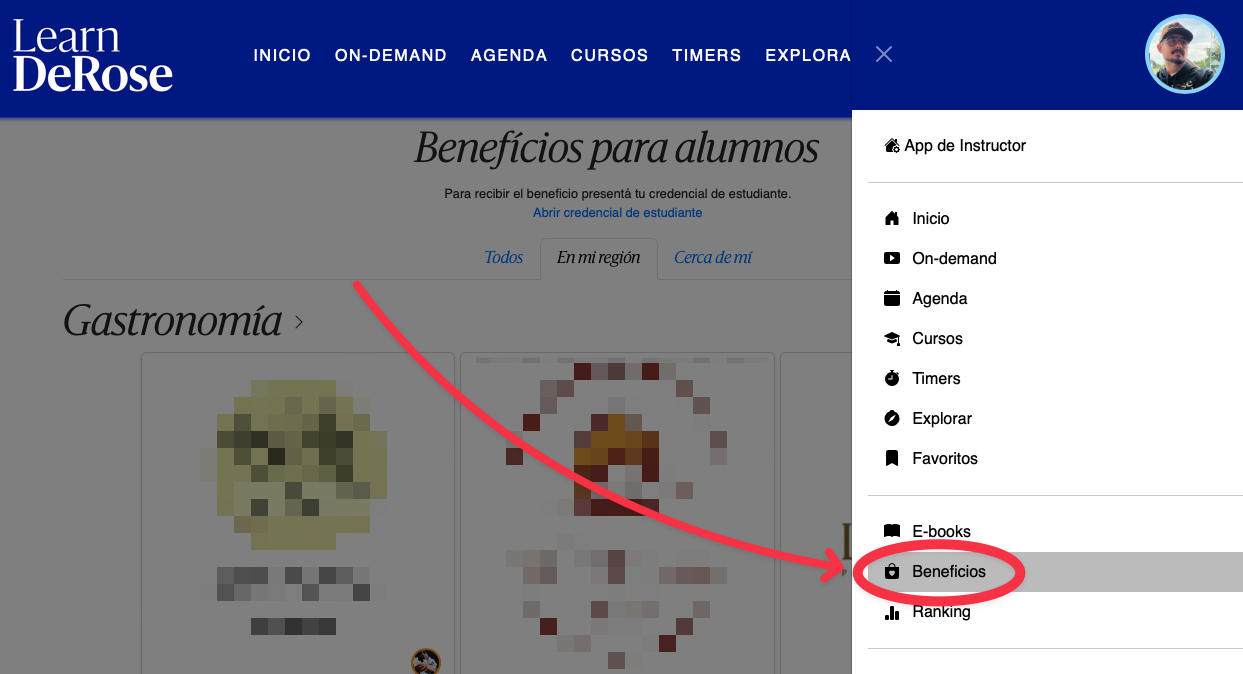
<a href="https://learn.derose.app/benefits">learn.derose.app/benefits</a>

<a id="625123de6ff9475198389d030e20a653"></a><a id="625123de-6ff9-4751-9838-9d030e20a653"></a>

<a id="da5b652976af48039bd64ae6f5a3039a"></a><a id="da5b6529-76af-4803-9bd6-4ae6f5a3039a"></a>

<img src="/help-assets/3b47d4e0bfe76c4132d3be8cf58972c2620d97e7eaf33c45865e6d1493566ed3.png" alt="CleanShot 2024-08-26 at 12.29.42.png">

<a id="b38fd1a994cd4cf4a56a5cc60fe92bc5"></a><a id="b38fd1a9-94cd-4cf4-a56a-5cc60fe92bc5"></a>

# <a id="quiénes-pueden-ver-los-convenios" data-help-heading="true"></a>Who can see the agreements

<a id="bc9ad73c2d1a49edbd550b84b4fb8072"></a><a id="bc9ad73c-2d1a-49ed-bd55-0b84b4fb8072"></a>

The “Benefits for students” screen is visible to all users registered as <strong>STUDENTS in PADMA</strong>. 

<a id="85d7dacde1d34877b106b36ee533a778"></a><a id="85d7dacd-e1d3-4877-b106-b36ee533a778"></a>

# <a id="secciones-de-la-pantalla-de-beneficios" data-help-heading="true"></a>Sections of the benefits screen

<a id="7e842d0fb9a942a7bed10db43da34784"></a><a id="7e842d0f-b9a9-42a7-bed1-0db43da34784"></a>

## <a id="pestaña-todos" data-help-heading="true"></a>Tab “All”

<a id="3bb60d54ad434dd3871625cc48b8014d"></a><a id="3bb60d54-ad43-4dd3-8716-25cc48b8014d"></a>

This section shows all current agreements.

<a id="b0e9e4e925c04760a5988277feede1d8"></a><a id="b0e9e4e9-25c0-4760-a598-8277feede1d8"></a>

## <a id="pestaña-en-mi-región-100-km" data-help-heading="true"></a>Tab “In my region” (100 km)

<a id="cdbfd49bde75408ca8f8940339409d2e"></a><a id="cdbfd49b-de75-408c-a8f8-940339409d2e"></a>

This section only shows benefits located within <strong><u>100 km</u></strong> (radius) around the user's current location.

<a id="20598c7d9340480f80027d1e48169b8f"></a><a id="20598c7d-9340-480f-8002-7d1e48169b8f"></a>

<a id="edb7c0645b564cb2a4b84cfc5d5e5756"></a><a id="edb7c064-5b56-4cb2-a4b8-4cfc5d5e5756"></a>

For each agreement we consider 2 possible locations:

- <a id="8b8f6eb0fcf74729b4a43ae189399645"></a><a id="8b8f6eb0-fcf7-4729-b4a4-3ae189399645"></a>The location of the school registering the agreement
- <a id="d0b5b17d22f34cc2a0b72d145ba7e9c3"></a><a id="d0b5b17d-22f3-4cc2-a0b7-2d145ba7e9c3"></a>The location of the place linked in the agreement form.

<a id="3dc796bf0fd041ad830ae499993bc7ab"></a><a id="3dc796bf-0fd0-41ad-830a-e499993bc7ab"></a>

## <a id="pestaña-cerca-de-mí-3-km" data-help-heading="true"></a>Tab “Near me” (3 km)

<a id="1323f6d105df47e2b4a97da444e7f467"></a><a id="1323f6d1-05df-47e2-b4a9-7da444e7f467"></a>

This section only shows benefits located within <strong><u>3 km</u></strong> (radius) around the user's current location.

<a id="45a1ade6a3ca471294029eb23fc9b366"></a><a id="45a1ade6-a3ca-4712-9402-9eb23fc9b366"></a>

For each agreement we consider 2 possible locations:

- The location of the school registering the agreement
- The location of the place linked in the agreement form.

<a id="340f993805c947c6af36977b2b7120bc"></a><a id="340f9938-05c9-47c6-af36-977b2b7120bc"></a>

# <a id="quiénes-pueden-registrar-convenios" data-help-heading="true"></a>Who can register agreements

<a id="fd1e2a235bab4f08b9de7941f612bdbd"></a><a id="fd1e2a23-5bab-4f08-b9de-7941f612bdbd"></a>

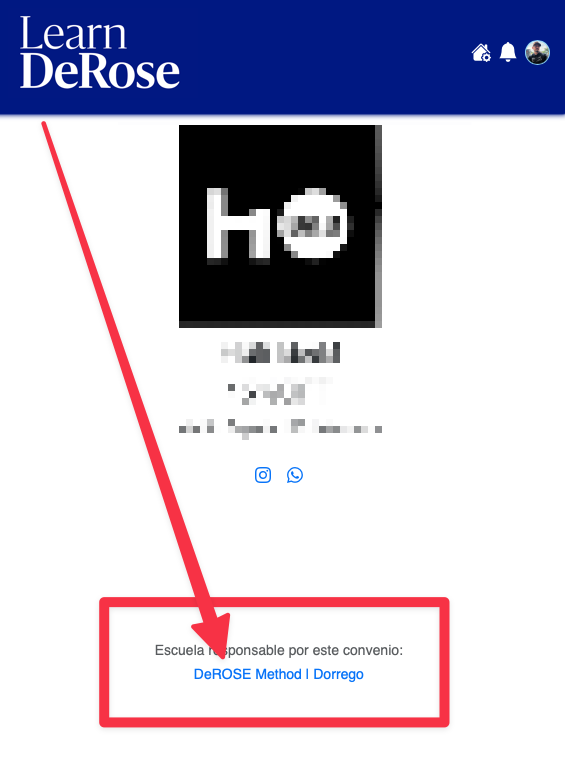
All schools can register agreements. Agreements registered by schools will be visible to students of <u><strong>all</strong></u> schools.

<a id="92d23ea7563a4d8a8b7e0350e9feb8a2"></a><a id="92d23ea7-563a-4d8a-8b7e-0350e9feb8a2"></a>

The school responsible for the agreement is indicated in each benefit.
<a id="6afa01cff8704cdc94e0cccdefbce7d4"></a><a id="6afa01cf-f870-4cdc-94e0-cccdefbce7d4"></a>

<img src="/help-assets/dfe5cccaf0ee763c0d69001fa8bad4dd6d59cf62ee63540a81b716a359a0e3b2.png" alt="CleanShot 2024-02-25 at 21.31.06.png">

<a id="b2066e57afed4243b56e0eb91061ee61"></a><a id="b2066e57-afed-4243-b56e-0eb91061ee61"></a>

# <a id="cómo-registrar-mis-convenios" data-help-heading="true"></a>How to register my agreements

<a id="23ed8bccfd3e4f9ab0eeed80a49f8d07"></a><a id="23ed8bcc-fd3e-4f9a-b0ee-ed80a49f8d07"></a>

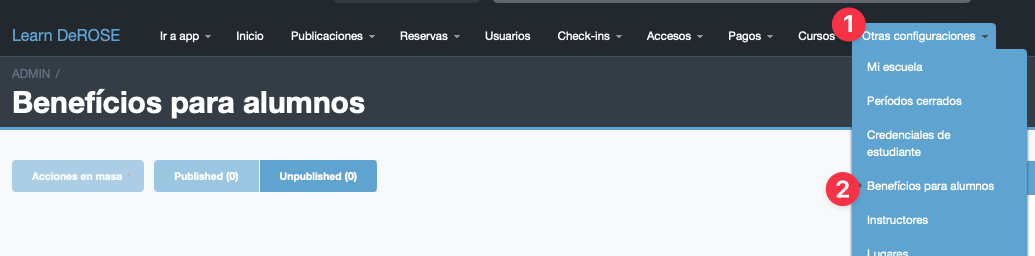
In the advanced Panel go to “Other settings > Benefits for students”
<a id="8c02feb7d05943919d0a6f06579440f6"></a><a id="8c02feb7-d059-4391-9d0a-6f06579440f6"></a>

<img src="/help-assets/bc0e42238a6d81790e318a1e2e733a1b606880c4b977d6a72a5a397fd877117a.png" alt="CleanShot 2024-02-25 at 20.32.56.png">

<a id="117cfc840e1c4b8db7928440b23c83f3"></a><a id="117cfc84-0e1c-4b8d-b792-8440b23c83f3"></a>

<a id="3fbfe9982ab14a9892d3d35d0775a177"></a><a id="3fbfe998-2ab1-4a98-92d3-d35d0775a177"></a>

## <a id="vigencia-del-convenio" data-help-heading="true"></a>Agreement validity

<a id="5eefd7c9dfc34c029587fe81c537553a"></a><a id="5eefd7c9-dfc3-4c02-9587-fe81c537553a"></a>

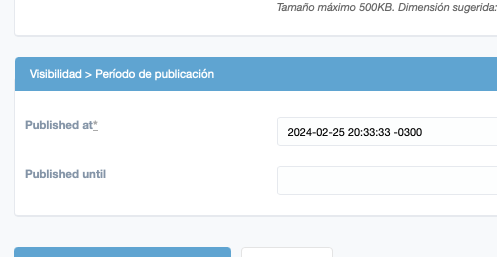
With the publication dates you can set the validity dates of the agreement so it is only visible during the agreement's validity period.
<a id="459b0deaae334993b9a208446a394ac4"></a><a id="459b0dea-ae33-4993-b9a2-08446a394ac4"></a>

<img src="/help-assets/2d94b7a366bc3ebcbd6a8a68db57b2497db9b4bb1694cc11973594cef70682ad.png" alt="CleanShot 2024-02-25 at 20.33.36.png">

<a id="e733d2e046044cc8a9a9eaaedcf39aff"></a><a id="e733d2e0-4604-4cc8-a9a9-eaaedcf39aff"></a>

<a id="9b7dc0ef0c614a5e826ab2371d872e15"></a><a id="9b7dc0ef-0c61-4a5e-826a-b2371d872e15"></a>

# <a id="credencial-de-estudiante" data-help-heading="true"></a>Student ID

<a id="4d5a7569998b4c4292b58fc5690bda88"></a><a id="4d5a7569-998b-4c42-92b5-8fc5690bda88"></a>

To request the benefits it is important that the student has their Student ID:

<a id="2af77cf3279642569dd9c0168cc7e163"></a><a id="2af77cf3-2796-4256-9dd9-c0168cc7e163"></a>

<a href="https://app.notion.com/p/cecad7594a744375bda807b19adfc1ec?pvs=204">Carteirinha (credencial) de estudante</a>