<a id="632ab70c041d470298e91ffaf444e60b"></a><a id="632ab70c-041d-4702-98e9-1ffaf444e60b"></a>

<a id="86a69692348943b0b594e78727195009"></a><a id="86a69692-3489-43b0-b594-e78727195009"></a>

- <a href="#148e3d17437443b490755070d494020d">What is it?</a>
- <a href="#43ecf84e41e940fb9284bcb70b6ba969">What is it for?</a>
- <a href="#3938e69bc7c945ffb67b0472e0020472">How users see it</a>
- <a href="#df6fd5e997f242ce95434b93000dc1cd">How the instructor can do it</a>
- <a href="#2723160bddf280d9bd09d2376466da85">Exceptions to the configuration</a>

<a id="5cb2779db62741f4a6402afd9eafbfb7"></a><a id="5cb2779d-b627-41f4-a640-2afd9eafbfb7"></a>

> Use late cancellation <strong>before</strong> the class. After the class, to register that a person with a reservation did not attend, use the function <a href="https://app.notion.com/p/3381aa2a311f4b3ba3170102ecfdbabd?pvs=204">Did not attend the reservation they made</a>. 

<a id="148e3d17437443b490755070d494020d"></a><a id="148e3d17-4374-43b4-9075-5070d494020d"></a>

# <a id="qué-es" data-help-heading="true"></a>What is it?

<a id="f0463876e1aa4771b5e1676dbb829a28"></a><a id="f0463876-e1aa-4771-b5e1-676dbb829a28"></a>

Late cancellation is the cancellation of reservations <strong>after the cancellation deadline</strong> set for the activity.

<a id="5f51eb1f11354e8999f8a3d4197e980f"></a><a id="5f51eb1f-1135-4e89-99f8-a3d4197e980f"></a>

For example, if a class has a cancellation deadline set for 40 minutes before the class and a student cancels 20 minutes before the class, this will be a late cancellation.

<a id="43ecf84e41e940fb9284bcb70b6ba969"></a><a id="43ecf84e-41e9-40fb-9284-bcb70b6ba969"></a>

# <a id="para-qué-sirve" data-help-heading="true"></a>What is it for?

<a id="bc6b1504ae3d4060ab5f49198d27211d"></a><a id="bc6b1504-ae3d-4060-ab5f-49198d27211d"></a>

Late cancellation frees the spot in the activity but continues consuming the user's quota if they had a reservation limit.

<a id="3938e69bc7c945ffb67b0472e0020472"></a><a id="3938e69b-c7c9-45ff-b67b-0472e0020472"></a>

# <a id="cómo-lo-ven-los-usuarios" data-help-heading="true"></a>How users see it

<a id="7255690ca52144dca3104845f4d261a0"></a><a id="7255690c-a521-44dc-a310-4845f4d261a0"></a>

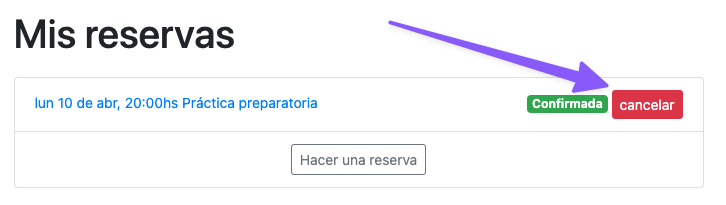
To cancel a class within the allowed time, the user sees the following button:
<a id="3b0d8605b3e44539a4575ebcdced9a22"></a><a id="3b0d8605-b3e4-4539-a457-5ebcdced9a22"></a>

<img src="/help-assets/f6f1ee2cf5dc1b36f85d41d5b64ee79843ecb095c94a849985441ed165d5928e.png" alt="CleanShot 2023-04-08 at 18.52.24.png">

<a id="46ea825b0d8f4f389fabb4564516ea6b"></a><a id="46ea825b-0d8f-4f38-9fab-b4564516ea6b"></a>

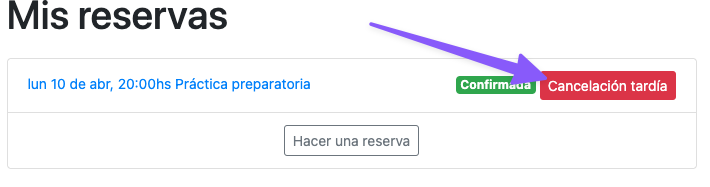
But to make a late cancellation, the button has a differentiated message:
<a id="c23545275e1f4209908e025bea08b46f"></a><a id="c2354527-5e1f-4209-908e-025bea08b46f"></a>

<img src="/help-assets/83cf9c7b0a17b9dd329ab867bb44d38eec2e55039da743ff5d782f02c3de5702.png" alt="CleanShot 2023-04-08 at 18.54.38.png">

<a id="df6fd5e997f242ce95434b93000dc1cd"></a><a id="df6fd5e9-97f2-42ce-9543-4b93000dc1cd"></a>

# <a id="cómo-puede-hacerlo-el-instructor" data-help-heading="true"></a>How the instructor can do it

<a id="4a433ea9ab424898b28815851d7ddf47"></a><a id="4a433ea9-ab42-4898-b288-15851d7ddf47"></a>

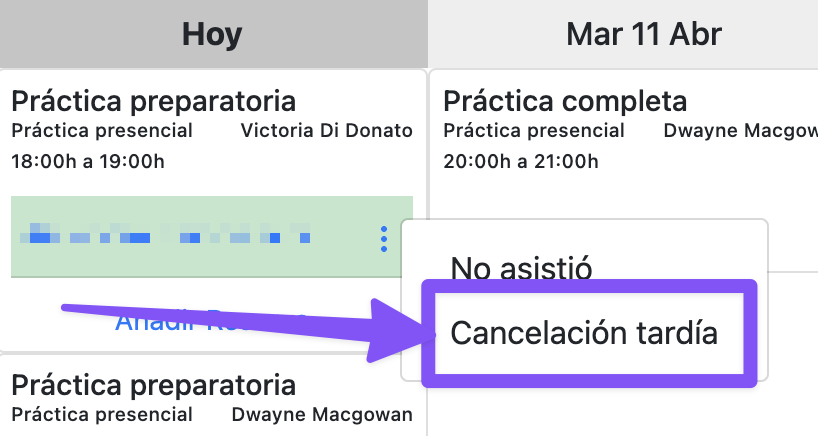
You can do it from the reservation screen in the admin panel or from the instructor app's schedule:
<a id="6b1d08729fa244fdb997b0e8a5d87ea3"></a><a id="6b1d0872-9fa2-44fd-b997-b0e8a5d87ea3"></a>

<img src="/help-assets/e7e81665453c273be8aecd8faa23c4f7d5e6a6aab1e5591dac120dd94c1dde31.png" alt="CleanShot 2023-04-10 at 17.56.28@2x.png">

<a id="2723160bddf280949d37ef13743e51ed"></a><a id="2723160b-ddf2-8094-9d37-ef13743e51ed"></a>

<a id="2723160bddf280d9bd09d2376466da85"></a><a id="2723160b-ddf2-80d9-bd09-d2376466da85"></a>

# <a id="excepciones-a-la-configuración" data-help-heading="true"></a>Exceptions to the configuration

<a id="2723160bddf280c8bcbff56be9bdea17"></a><a id="2723160b-ddf2-80c8-bcbf-f56be9bdea17"></a>

The school can configure how many minutes before the class cancellation is allowed. After that time, cancellations are considered “late cancellation” with the following exceptions:

- <a id="2723160bddf2807faf36faad583f6bfd"></a><a id="2723160b-ddf2-807f-af36-faad583f6bfd"></a>a reservation that was on the waiting list and received a spot after the cancellation deadline can be canceled normally, without the late cancellation penalty.
- <a id="2723160bddf280788f79f366b7fd244b"></a><a id="2723160b-ddf2-8078-8f79-f366b7fd244b"></a>when a reservation is created there are 5 minutes to cancel that same reservation without penalty.

<a id="27b3160bddf280bf911fd31b5b85ebfc"></a><a id="27b3160b-ddf2-80bf-911f-d31b5b85ebfc"></a>
