<a id="4dbbbe675164413bbe88130dbda5af4f"></a><a id="4dbbbe67-5164-413b-be88-130dbda5af4f"></a>

<a id="73dd1090d8ba44eb994601b4f1edb204"></a><a id="73dd1090-d8ba-44eb-9946-01b4f1edb204"></a>

<strong>If you are new to Padma, welcome-welcome!</strong>

<a id="5f56649d93ef4d54a93265ee03491fdd"></a><a id="5f56649d-93ef-4d54-a932-65ee03491fdd"></a>

<a id="e3f0b3bf021c4b258f06e52d4f14b10a"></a><a id="e3f0b3bf-021c-4b25-8f06-e52d4f14b10a"></a>

  - <a href="#40ec6061553f4e60889011a3f408c8b8">How to access Padma from your school</a>
  - <a href="#75acfd49e75b49c1baf96ed459580f9c">Register contacts</a>
    - <a href="#a2bf261151224787bb68a9ef9f071ecb">Manually register a new contact</a>
    - <a href="#454412d2631a4398a9c31c111f5482c7">Automatically register contacts</a>
- <a href="#0613dd0de8f845d58ebd84c95e15ca3b">Customized contact lists</a>
- <a href="#9e385dab4bf247e39b983368f7d8f915">Monitoring indexes</a>
- <a href="#717e25c619e549e9850793b2b22031f5">Registration form</a>
- <a href="#655499e90eb04e419d02380119c65d03">Monitoring pedagogical participation</a>

<a id="0c6e93fadbea4725a1ae43fa750b858e"></a><a id="0c6e93fa-dbea-4725-a1ae-43fa750b858e"></a>

<a id="40ec6061553f4e60889011a3f408c8b8"></a><a id="40ec6061-553f-4e60-8890-11a3f408c8b8"></a>

## <a id="como-acessar-o-padma-de-sua-escola" data-help-heading="true"></a>How to access Padma from your school

<a id="f2c7a3b1a7784e75a064e65a118d9185"></a><a id="f2c7a3b1-a778-4e75-a064-e65a118d9185"></a>

To have access, the principal (or the system administrator at your school) needs to <a href="/b5b63c58b3b7452bbd5005a61f2ddcc0?pvs=25"><strong>send an invitation to you</strong></a>, then you must enter a link that was sent to your e-mail.

<a id="59c57b2647ec4b34a8c90b76e8c29348"></a><a id="59c57b26-47ec-4b34-a8c9-0b76e8c29348"></a>

<a id="f3a8d2996d0e4c5aaadafb36855fc209"></a><a id="f3a8d299-6d0e-4c5a-aada-fb36855fc209"></a>

<a href="https://app.notion.com/p/2df1c4c7824347cb9f94ed79561e07e9?pvs=204">Release different Padma functions for team instructors</a> 

<a id="75acfd49e75b49c1baf96ed459580f9c"></a><a id="75acfd49-e75b-49c1-baf9-6ed459580f9c"></a>

## <a id="cadastrar-os-contatos" data-help-heading="true"></a>Register contacts

<a id="9658f7e2122a4632931cc992a6a1622b"></a><a id="9658f7e2-122a-4632-931c-c992a6a1622b"></a>

In Padma prospects, students and former-students are all ‘Contacts’.

<a id="3de258683d6141d4b6cb44e4c323f3bf"></a><a id="3de25868-3d61-41d4-b6cb-44e4c323f3bf"></a>

<a id="a2bf261151224787bb68a9ef9f071ecb"></a><a id="a2bf2611-5122-4787-bb68-a9ef9f071ecb"></a>

### <a id="cadastrar-um-novo-contato-manualmente" data-help-heading="true"></a>Manually register a new contact

<a id="cb2031085969433e804908de1d12cba2"></a><a id="cb203108-5969-433e-8049-08de1d12cba2"></a>

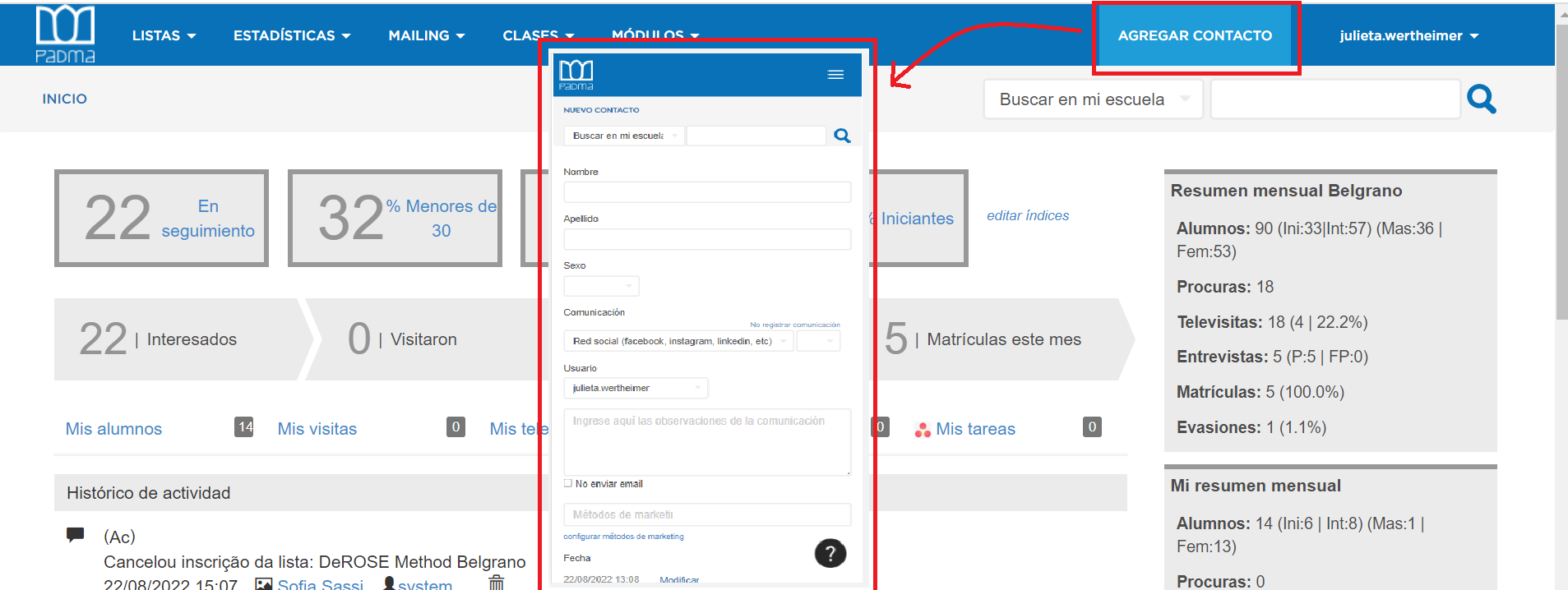
You can register your contacts through the <a href="https://crm.padm.am/contacts/new"><strong>form</strong></a>:

<a id="5330f1ad4198409db3bb2de9cd57cb24"></a><a id="5330f1ad-4198-409d-b3bb-2de9cd57cb24"></a>

<img src="/help-assets/cf89e3072caf4d9ec24bbb4dd31e4971b84a7a3d84d9013fd3f7cb5a00886f1a.png" alt="contacto.png">

<a id="d9862f525b4d4af9944c8f8b6e9226c2"></a><a id="d9862f52-5b4d-4af9-944c-8f8b6e9226c2"></a>

<a id="66e2fd52725a4092afd98250f9d40dc7"></a><a id="66e2fd52-725a-4092-afd9-8250f9d40dc7"></a>

<strong>Important: </strong>complete some mandatory fields to save the registration. For example: coefficient and <a href="https://crm.padm.am/marketing_methods">mkt method</a>.

<a id="454412d2631a4398a9c31c111f5482c7"></a><a id="454412d2-631a-4398-a9c3-1c111f5482c7"></a>

### <a id="cadastrar-contatos-automáticamente" data-help-heading="true"></a>Automatically register contacts

<a id="f13b94ae9c8c4419bcb1218a55452762"></a><a id="f13b94ae-9c8c-4419-bcb1-218a55452762"></a>

Registration can be done automatically via Learn or through various integrations:  <a href="https://app.notion.com/p/3c39f193b705449a875de0035867cdc9?pvs=204">Automation of leads / contacts registrations</a> 

<a id="008c7538b79c48d281dd1b9e75359412"></a><a id="008c7538-b79c-48d2-81dd-1b9e75359412"></a>

<a id="0613dd0de8f845d58ebd84c95e15ca3b"></a><a id="0613dd0d-e8f8-45d5-8ebd-84c95e15ca3b"></a>

# <a id="listas-de-contatos-personalizadas" data-help-heading="true"></a>Customized contact lists

<a id="629b079a9e8a4186b3a5260a1567615e"></a><a id="629b079a-9e8a-4186-b3a5-260a1567615e"></a>

You can create lists with data of your interest to speed up your searches. This can be used for good monitoring of students and prospects.

<a id="400c1f3e73dc4e9bbf25f25aa6061103"></a><a id="400c1f3e-73dc-4e9b-bf25-f25aa6061103"></a>

<a href="https://app.notion.com/p/400c1f3e73dc4e9bbf25f25aa6061103?pvs=204">Create a list in PADMA and save a search</a>

<a id="9e385dab4bf247e39b983368f7d8f915"></a><a id="9e385dab-4bf2-47e3-9b98-3368f7d8f915"></a>

# <a id="índices-de-acompanhamento" data-help-heading="true"></a>Monitoring indexes

<a id="3d8dadbfce83466597f7944cdbe42686"></a><a id="3d8dadbf-ce83-4665-97f7-944cdbe42686"></a>

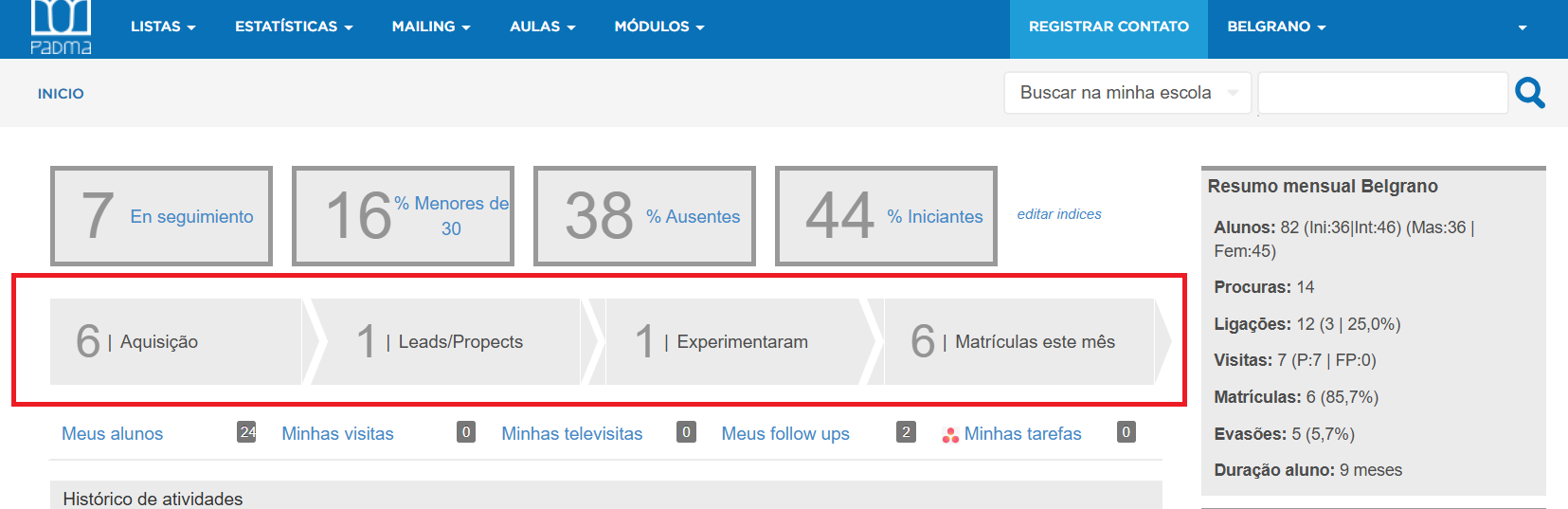
On the home page, the first thing you will find are two rows with monitoring indexes.

<a id="19e074b5ebf24517af29addeee4abe62"></a><a id="19e074b5-ebf2-4517-af29-addeee4abe62"></a>

The boxes serve for you to determine which <em>customized information</em> you want to put there, whether of students or prospects.

<a id="1a00cbd2a8bc45d1a2cc2b61fc92a3ef"></a><a id="1a00cbd2-a8bc-45d1-a2cc-2b61fc92a3ef"></a>

The second row is related to marketing, it would be a &quot;timeline&quot; that suggests you move to the next action.  Have on hand the number of people who contacted you, which of them visited, if they took a trial class and which of them enrolled in the month.
<a id="1433160bddf280d69074e45ea64a4fff"></a><a id="1433160b-ddf2-80d6-9074-e45ea64a4fff"></a>

<img src="/help-assets/b2a2730762e5d51e5da943afd28926319421e76250dc33d9686792083cbe6ce2.png" alt="padma.png">

<a id="d4821e8bda2a4ca4877f3983e20a227d"></a><a id="d4821e8b-da2a-4ca4-877f-3983e20a227d"></a>

<a id="b655cde2b5cb474a923b1306910b79d9"></a><a id="b655cde2-b5cb-474a-923b-1306910b79d9"></a>

<strong>Acquisition:</strong> prospects of the month, without coefficient classification 

<a id="8469038aae334ec29650d3222bd0838e"></a><a id="8469038a-ae33-4ec2-9650-d3222bd0838e"></a>

<strong>Leads/prospects</strong>: contacts under monitoring considered profiles

<a id="1433160bddf28070b92dfc02c2d6999d"></a><a id="1433160b-ddf2-8070-b92d-fc02c2d6999d"></a>

<strong>Tried:</strong> prospect who took a class (has a check-in on Learn)

<a id="9fc81321c70048649662c79709f6c602"></a><a id="9fc81321-c700-4864-9662-c79709f6c602"></a>

<strong>Enrollments:</strong> number of enrollments in the month

<a id="f0a60ae57cab46b595c07df369c8aec5"></a><a id="f0a60ae5-7cab-46b5-95c0-7df369c8aec5"></a>

<a id="f4cdad0e6c7744979a2e27a886ddd992"></a><a id="f4cdad0e-6c77-4497-9a2e-27a886ddd992"></a>

<mark>This information can be used to carry out a targeted campaign, make interested people visit the school and then offer a trial period or, better yet, enroll-directly 💪.</mark>

<a id="a8ce186b853647feba3f79c1cd8c4f4c"></a><a id="a8ce186b-8536-47fe-ba3f-79c1cd8c4f4c"></a>

<a id="717e25c619e549e9850793b2b22031f5"></a><a id="717e25c6-19e5-49e9-8507-93b2b22031f5"></a>

# <a id="formulário-de-matrícula" data-help-heading="true"></a>Enrollment form

<a id="8c43838b17924e098d5066e4765f154a"></a><a id="8c43838b-1792-4e09-8d50-66e4765f154a"></a>

Share the <a href="https://app.notion.com/p/18d4b58a53d843f6855c524155dc3c87?pvs=204">Enrollment Forms / Liability</a>  with your prospects and their data will be saved in their profiles.

<a id="df7bb3dc54474c41881957dd270d2b9a"></a><a id="df7bb3dc-5447-4c41-8819-57dd270d2b9a"></a>

You <strong>can set up an automatic e-mail</strong> to send the form or create your own contract using forms with digital signature via <a href="https://app.notion.com/p/a634a37443c9484f977663d5eb214325?pvs=204">Integration with eSignatures via Zapier</a>.

<a id="3a647424f5c2400db242680c16f65831"></a><a id="3a647424-f5c2-400d-b242-680c16f65831"></a>

<a id="655499e90eb04e419d02380119c65d03"></a><a id="655499e9-0eb0-4e41-9d02-380119c65d03"></a>

# <a id="acompanhamento-da-participação-pedagógica" data-help-heading="true"></a>Monitoring pedagogical participation

<a id="39ef116d25e7471db7abb3ef0b456b5b"></a><a id="39ef116d-25e7-471d-b7ab-b3ef0b456b5b"></a>

> We recommend tracking classes and attendance in <a href="https://app.notion.com/p/b0e36f309d9249e897a693262ec9b518?pvs=204">Learn</a>   and taking advantage of the integration between both systems. 

<a id="84adc7d047ed416bbd6903e7b6fee1e8"></a><a id="84adc7d0-47ed-416b-bd69-03e7b6fee1e8"></a>

Here you find more information: <a href="https://app.notion.com/p/249b4f135b9d4d02bac0b7bdcb7fde23?pvs=204">Getting started with Learn</a>